Skip to content

Not open yet. GivJoy expects to open in January 2027.

Everything a small team needs to raise money and thank people.

GivJoy takes gifts and ticket sales, keeps one record for each supporter and helps you follow up. Each feature shows the plans that will include it.

Planned plans: Free (0% GivJoy fee), Starter (1%) and Pro (2%), each plus card processing. Final details at launch.

What makes GivJoy different

Honest fees. A teammate named Bryn. Everything in one place.

Gift $50.00Fees $2.32Tip $0

Honest fees, no tips

GivJoy never asks donors for a tip. Donors see the gift, the fees and the total before they pay, and covering the fees is shown in dollars. Your nonprofit pays a plain percentage, with no monthly bill.

Where does your gift go?

Bryn works the follow-up. You work the mission.

Bryn is GivJoy's AI assistant. On every plan she drafts when you ask. On Pro she also drafts welcomes, follows up on failed payments and tells you who to call. She works from facts you've confirmed, and your team decides what sends.

Bryn's on it.

Meet Bryn

Everything a small team needs, in one place

Donation pages, monthly giving, events with check-in, supporter records, receipts and year-end statements, reports, website embeds, Zapier (Starter and Pro) and Move to GivJoy, which brings your history over, and invites each monthly donor to restart from a personal link.

See plans and fees

In development All of this is being worked on.

Setup and moving in

Bryn walks you through setup. Bringing your old records is optional, and you check everything first.

Every planSee a move to GivJoy, step by step

Your first week

  1. Say hello to Bryn

    She reads your website and you confirm each fact. It takes about four minutes, or use a short form.

  2. Connect Stripe

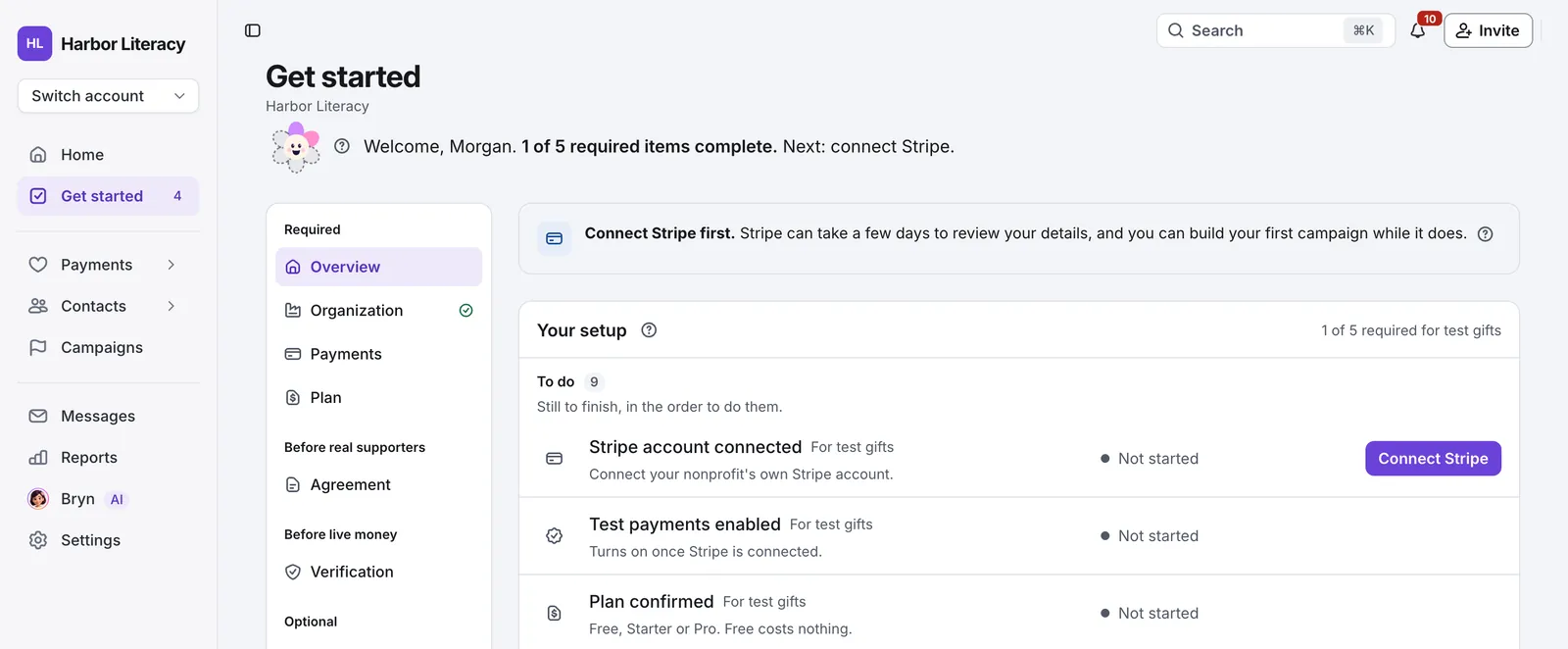
    Gifts go straight to your own account. Stripe can take a few days to review your details.

  3. Pick a plan and test a gift

    Free is offered first. Publish a test campaign and make a test gift before any real donor sees it.

  4. Bring your supporters overOptional

    Upload exports from your old tool or a spreadsheet. Review the import plan before anything lands, and undo it if it’s wrong.

  5. Move your monthly donorsOptional

    See who can move as they are and who needs a quick restart. You choose when their emails go.

You can connect a Stripe account you already have, or create one.

The Get started checklist for a made-up nonprofit: 1 of 5 required items complete, with Connect Stripe first, then test payments and the plan, each with its status.
Design previewThe Get started checklist, with example data

Take gifts

Give donors a clear, quick way to give, and know what every gift costs.

FeatureWhat it doesPlans
Donation pagesA branded giving page for each campaign, with suggested amounts, a custom amount and stories about what a gift does.Closing a campaign stops new gifts. Its monthly donors keep giving.Every plan

Free runs one live campaign at a time, with no time limit; Starter and Pro have no limit.

Website embedsThe same giving form inside your own website, so donors never leave it.Every plan
Monthly givingDonors start a monthly gift, then change the amount, update their card, pause or stop it themselves.When a card fails, GivJoy retries it 3, 7 and 14 days later.If the donor updates it, you see: "Hannah updated her card. $25.00 collected Oct 8."Recurring gifts are monthly. Quarterly and yearly aren't offered at opening.Every plan
Bank debitDonors can give straight from a US bank account. Tickets take cards and wallets only.Every plan
Apple Pay and Google PayDonors pay with Apple Pay or Google Pay, for gifts and tickets.Every plan
Fee coverage, line by lineDonors can cover the fees. Checkout shows the gift, the added amount, the total and what you receive before anyone pays, and the option is easy to remove.Every plan
Receipts and tribute noticesA receipt goes out for every gift made through GivJoy once the payment is confirmed.A donor giving in honor or memory of someone can ask for a notice to be sent to the person they name.Year-end giving statements are planned too.Every plan
No GivJoy fee on cash and checksRecord a cash or check gift by hand. GivJoy charges no fee on it.Every plan
Your accountSupporters can sign in to Your account for gifts, events, receipts and preferences, and manage their monthly gifts.Donors don't need an account to give.Every plan
Sign in with an emailed codeSupporters sign in with a code emailed to them, never a password.Every plan
All your givingA donor who gives to two or more nonprofits on GivJoy sees it all in one sign-in: the year's total by nonprofit and every receipt.Every plan

Run campaigns and events

Build a campaign by describing it, sell tickets and know who's coming.

FeatureWhat it doesPlans
Build a campaign with BrynTell Bryn about your campaign in your own words. She builds a private draft page beside the chat, never invents dates, prices or what money buys, and nothing goes public until you review and publish.Every plan
Share your campaignA link and a QR code for every campaign, and Bryn writes sharing posts and makes images after you publish.Every plan
Event pages and ticketsFree or paid tickets, named guests, your own questions and ticket codes for discounts. A fundraising event can take a gift alongside the tickets.Every plan

On Free, your one live campaign can be an event.

Cash and check registrationsRecord tickets someone paid for at the office or the door. No GivJoy fee on cash or check.Every plan
Guest list and check-inA searchable guest list and check-in from a phone at the door, with a link you can hand to a volunteer.Every plan
Email your guestsReminders and "know before you go" emails Bryn drafts from your event's details when you ask. You review the draft and recipients before confirming.Every plan
Guest changes and cancellationsBuyers fix guest names or cancel before the event starts. Online refunds start on their own.GivJoy and Stripe keep their fees, so a refund costs you those.Every plan

Know your supporters

One record for each person, with gifts, tickets, notes and calls together.

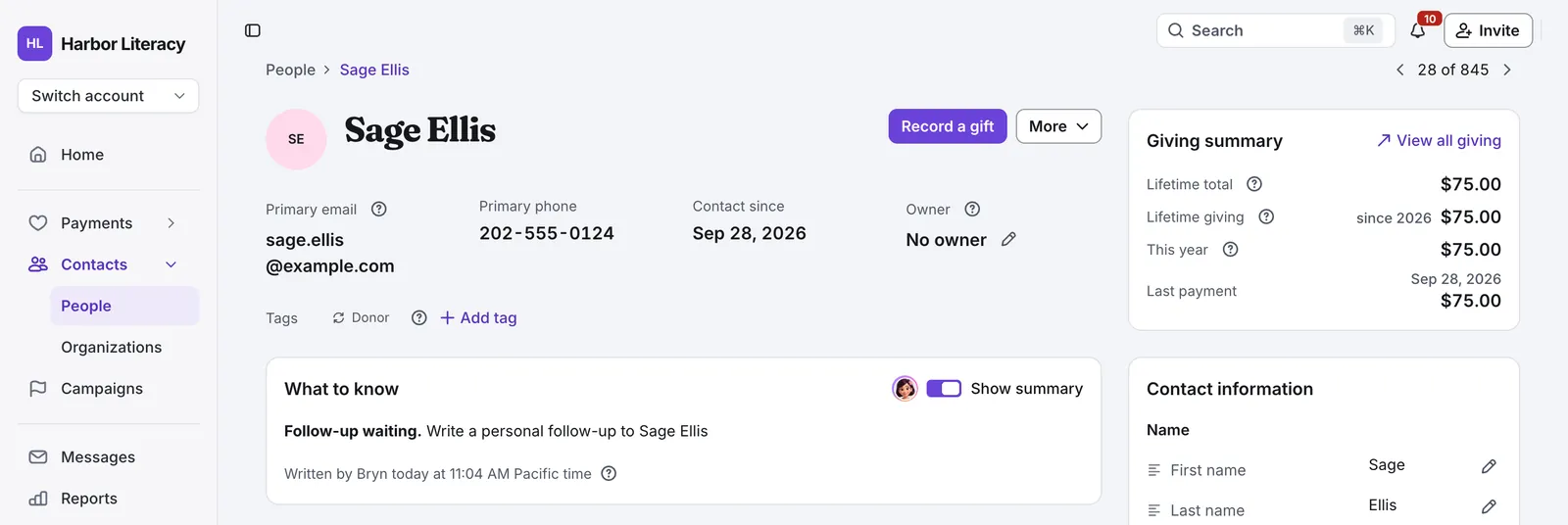
The contact record for Sage Ellis, a made-up donor: email, phone and contact date, a What to know summary from Bryn, her name details and a giving summary of $75.00.
Design previewA supporter record, with example data
FeatureWhat it doesPlans
ContactsOne contact record per person, with gifts, tickets, notes, calls and households. Move to GivJoy brings history from any system or spreadsheet, on every plan.Every plan
Businesses and foundationsA business or foundation can give, with its own record and receipt.Every plan
Unlimited staff, Finance includedAdd as many staff as you need. The Finance role is for treasurers and bookkeepers.Every plan
Notes, calls and tasksLog calls and notes on each contact, and give tasks to your team with due dates.Every plan
"What to know"A short summary at the top of each contact page, written by Bryn, of what you'd want to know before you call.Starter and Pro
Supporter choicesSupporters choose whether they get optional email. Your staff can't override what a supporter chose.Every plan
Duplicates and data qualityOne page lists possible duplicate records, bounced emails and records to check. Merge two records, undo a merge or move a single gift to the right person, with every effect spelled out before you confirm.Every plan

On Pro, Bryn also explains possible matches.

Follow up

Thank people while the gift still feels new, and keep in touch between campaigns.

FeatureWhat it doesPlans
Automatic thank-you emailEvery campaign sends a thank-you you wrote, with the receipt kept separate.Every plan
"Thank you for coming" emailGoes to your guests automatically the morning after the event, from a template you write once. You can turn it off for any event.Every plan
Bryn, when you askAsk a question, get a draft email, or have her build a report. Nothing reaches a supporter until a person sends it.Every plan
Email from your own domainThank-yous and personal email come from your organization's own address. Receipts keep coming from GivJoy with your name on them.Starter and Pro
Bryn's nine jobsOn Pro, Bryn doesn't wait to be asked. She welcomes first-time donors, follows up failed monthly payments, marks milestones, thanks ticket buyers who have never given, makes four kinds of gentle gift requests and gives your staff a weekly list of who to call. See BrynPro
You decide what sends
Every job starts Off.Once on, each email waits for your OK.Bryn asks any one person for money at most once every 90 days.
Undo, pause and sending without askingImmediate sends have ten-second Undo; scheduled emails can be stopped until they go.An administrator can let a job send without asking.Anyone on your team can pause every job with one switch.
Pro

Report to your board

Answer the board's questions without an evening in a spreadsheet.

FeatureWhat it doesPlans
Seven standard reportsGiving, payouts, a one-page board summary, campaigns, monthly giving, events and data quality.Every plan
Ask for a report in plain EnglishDescribe the report you want. Bryn builds it from GivJoy's own definitions, and you keep refining it until it's right, then save it.Every plan
Team dashboardOne team dashboard. Administrators can change it with Bryn; permissions still apply.Every plan
Your year in givingEach January, a short set of cards about the year you can share with your board. On Pro, it ends with Bryn's year.Every plan
Explanations and next stepsOn Pro, ask Bryn about a report and she explains what changed and suggests next steps.Pro

Connect your tools

Send your data where you already work, and take all of it with you any time.

FeatureWhat it doesPlans
ZapierSends new gifts, donors, monthly-giving changes, refunds, registrations and check-ins to your other apps, such as Google Sheets, Slack and Mailchimp. Zapier only receives; it can't change anything in GivJoy.Starter and Pro
AI assistantsConnect an AI assistant, such as Claude, to ask about your giving or draft a campaign. It can do only what your role allows, and it never emails supporters, changes contact records or publishes anything.Every plan
Download all your dataEverything in one download, with a guide to every column and ready-made Excel and Power BI files. Report exports and a file for your accountant, too.Every plan

For developers: what connects today, what's planned and what isn't.

Coming later

FeatureWhere it standsStatus
TextingGift and event texts, mass texts and replies, with each supporter's separate permission. Later, as a paid add-on with a prepaid monthly bundle of texts. Not on Free.In development
Newsletters and mass emailStyled templates first, then a template builder.Exploring
Peer-to-peer fundraisingSupporters raising money on their own page for your campaign.Exploring

Also not in the first release: auctions, raffles, assigned seating, a public developer API, general webhooks, Zapier actions or searches, and Salesforce and QuickBooks connections.

The GivJoy launch list

The launch list isn't open yet. Please check back soon.

You can email support@givjoy.io with questions.

What the labels mean
Exploring
We are looking into the problem. It may never be built.
In development
We are working on it. Not usable yet.
Early access
A few invited nonprofits can use it, in test mode where that applies.
Live
Available to the stated audience.
Not pursuing
Dropped or paused, with a short reason and a date.

Each feature also shows its plan: Every plan, Starter and Pro, or Pro.