Every plan, Free and Starter included
Bryn when you ask
- Questions
- Campaign and email drafts
- Reports
- Sharing posts and images
Not open yet. GivJoy expects to open in January 2027.
Meet Bryn, your newest teammate.
Bryn is GivJoy's AI assistant. On every plan, she answers questions and drafts campaigns, emails and reports when you ask. On Pro, she doesn't wait to be asked.
Made-up example
Example month at Harbor Literacy: $640 given after Bryn's asks, $120 collected after payment follow-ups.
"After" means a gift or payment from the same person within 30 days of Bryn's email. It's what followed, never a claim the email caused it.

Every plan, Free and Starter included
Pro (2%)
Nine jobs fill the quiet months between a supporter's receipt and the next time they hear from you.
On Pro
Each job watches for one moment, like a first gift or a failed card, and drafts the email for it.
Bryn's nine Pro jobs
Thanks new donors about two hours after their first gift, with a story ten days later.
Asks for money: No
Welcome to Harbor Literacy, Priya
Thank you for your first gift.
It helps a child near you meet a reading tutor.
Thanks monthly donors at their 6th and 12th gifts and yearly, plus first-gift anniversaries.
Asks for money: No
A whole year of reading, Dana
Your 12th monthly gift came in today.
Thank you for a full year with us.
A week after an event, thanks guests who have never given and explains your work.
Asks for money: No
Thanks for coming to the Fall Book Fair
It was great to see you there.
Here's what we do the rest of the year.
Helps a monthly donor update or stop a gift once retries can't fix the payment.
Asks for money: No
Your monthly gift needs a new card
Your card on file didn't go through.
Choose what happens next.
90 daysFour jobs invite another gift. Together they ask anyone at most once every 90 days.
If a first-time donor hasn't given again in 60 days, it invites a second gift.
Asks for money: Yes
How Mateo's reading took off, Sam
Here's a story from this fall.
Would you give again?
Two weeks after a donor's second one-time gift, it invites them to give monthly.
Asks for money: Yes
Join our monthly readers, Lee?
You've given twice this year. Thank you.
A monthly gift keeps tutoring steady.
Thirteen months after someone's last gift, it writes once to invite them back.
Asks for money: Yes
It's been a while, Ana
We've missed you at Harbor Literacy.
Here's what's new this year.
Three weeks after a monthly gift stops, it invites the donor to restart or fix it.
Asks for money: Yes
Pick up where you left off?
Your monthly gift stopped last month.
You can restart that same gift.
Each Monday, your team gets up to ten people worth a call, with reasons.
Asks for money: No
Up to ten each Monday
| Plan | What Bryn does |
|---|---|
| Free (0%) | Answers questions, drafts campaigns and emails, builds reports, and writes sharing posts and share images, when staff ask. |
| Starter (1%) | The same, plus a What to know summary at the top of each contact page. |
| Pro (2%) | The same, plus the nine jobs below, which she runs without being asked. |
On Free and Starter she does not watch for events or run jobs. Anything staff ask her for that reaches supporters or the public, or moves money, asks once before it happens.
Each job watches for one moment, like a first gift or a failed card, and drafts the email for it. Jobs send only between 8:00 AM and 8:00 PM in the nonprofit's time zone. Staff can change each job's timing.
| Group | Job | What it does | When | Asks for money |
|---|---|---|---|---|
| Thanks and updates | Welcome first gifts | Thanks a donor who is new to the nonprofit, then follows up with a real story about the work. | Thank-you 2 hours after the gift; follow-up 10 days later. | No |
| Thanks and updates | Monthly milestones and anniversaries | Thanks monthly donors at their 6th and 12th paid gift and each later 12-month mark, and recent donors on the anniversary of their first gift. | On the day. | No |
| Thanks and updates | Ticket buyers to donors | Thanks event guests who have never given, and says what the nonprofit does. | 7 days after the event. | No |
| Payments | Follow up failed monthly payments | Helps a monthly donor fix or stop a gift whose payment failed. The email offers Update payment and Stop my monthly gift side by side, and a person on the team gets a task. | When retries can't fix it, or after the last retry fails. | No |
| Asks | Ask for a second gift | Invites a first-time donor to give again. | 60 days after a first gift, if they haven't given again. | Yes |
| Asks | Ask to go monthly | Invites a donor who has given twice to become a monthly donor. | 14 days after a second one-time gift. | Yes |
| Asks | Reconnect lapsed donors | Writes to people who gave before and stopped. | 13 months after their last gift. | Yes |
| Asks | Win back stopped monthly gifts | One note inviting the donor to resume or repair the same monthly gift. | 3 weeks after it stops or starts needing attention. | Yes |
| For your team | Who to call | Gives each Super Admin, Administrator and Team Member a weekly list of up to 10 people worth a call, with why, and a call task for big gifts. Sends no supporter email. | Mondays, and when a big gift arrives. | No |
Four jobs invite another gift. Together they ask anyone at most once every 90 days.
Welcome first gifts, made-up examples of who gets what:
A new Pro nonprofit starts with one suggestion, Start with these three: three of the jobs that never ask for money, turned on together.
Each plan has one shared limit on AI help, set high enough that only misuse reaches it. Nonprofits never see a meter or a count, and GivJoy doesn't publish the numbers. Bryn's emails have no monthly allowance; the per-person limit is the only limit a nonprofit sets on her.
Bryn drafts. Your team decides what sends.
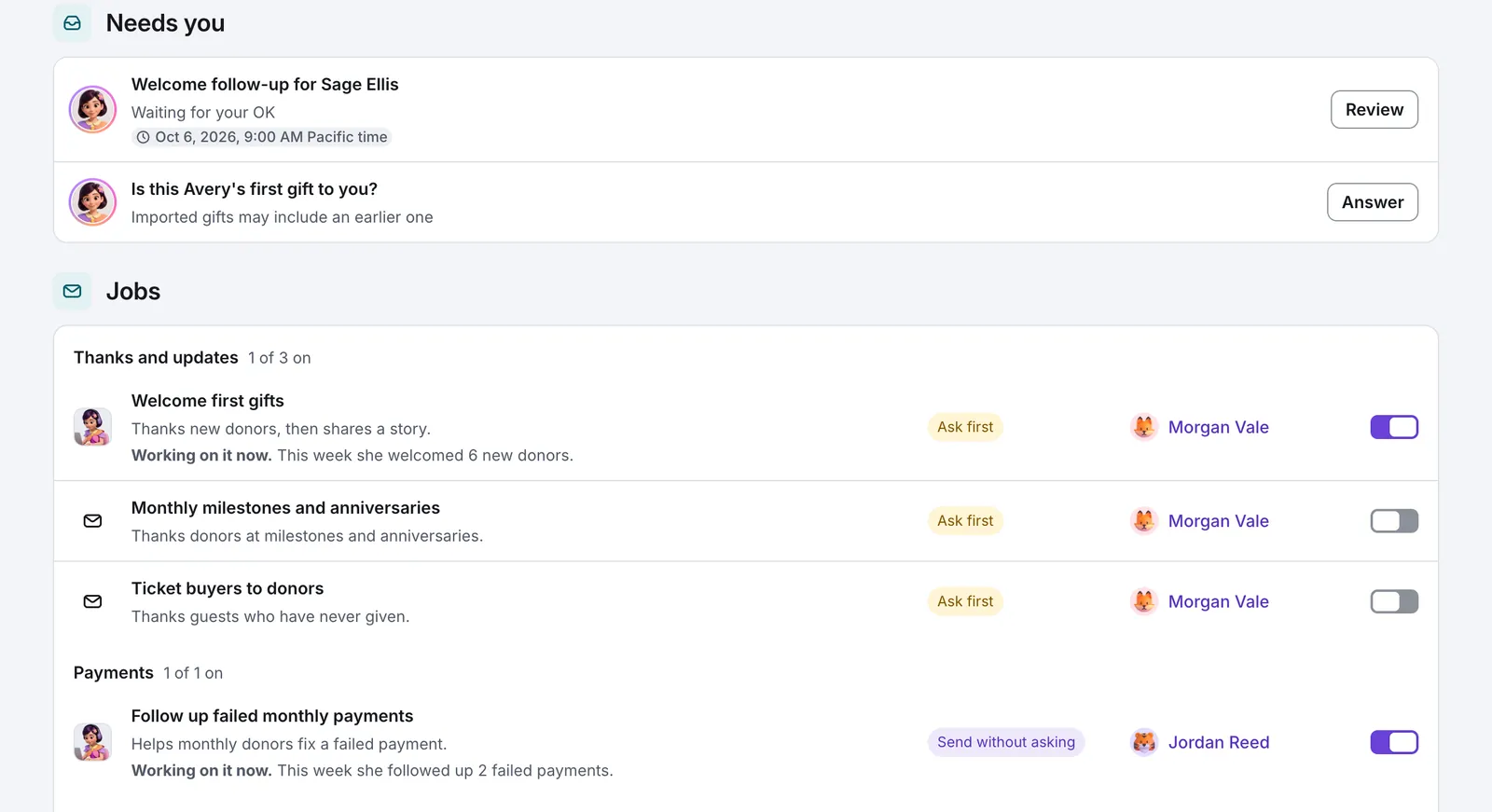
Emails Bryn sends without asking come from the nonprofit's team name, such as The Harbor Literacy team, with replies going to the nonprofit's own inbox. A person's name appears only on an email that person approved. Emails to supporters do not name Bryn or AI. GivJoy never promises that AI help is hidden, and staff answer honestly when someone asks. Bryn does not appear on donation pages, event pages or checkout.
We won't tell you Bryn raises more money.
Bryn's monthHarbor Literacy, a made-up nonprofit
An example week at Harbor Literacy, a made-up nonprofit. Every name and amount is invented, and nothing is sent.
Who to call: six people this week. Start with Gloria, who just gave three times her usual.
Who said OK No email, so nothing to approve.
Priya's first gift, $40.00. The welcome waited on "Ask first"; Maria changed one line and said OK, and it sent at 2:00 PM Pacific time, its real time.
Who said OK Maria.
A monthly donor's card expired, which retries can't fix. The required payment notice already went, and the follow-up offered Update payment and Stop my monthly gift side by side.
Who said OK Sent without asking, a choice Maria made for this job.
Dana's 12th monthly gift. She got a thank-you for a full year of giving.
Who said OK Sent without asking, a choice Maria made for this job.
The Fall Book Fair was a week ago. Ticket buyers to donors thanked the guests who have never given and said what Harbor Literacy does. It did not ask for money.
Who said OK Sent without asking, a choice Maria made for this job.
A second-gift ask came due for someone asked six weeks ago. Not sent: Asked recently. Nobody got asked twice.
Who said OK Nobody needed to. The 90-day limit held it back.
This week: 9 emails, 1 needed you, 6 people to call. We count 5 minutes for each email. Bryn's week. Your weekend.
Who said OK 1 needed you: Tuesday's welcome.
 Welcome first giftsAsk first
Example only, with made-up donors and amounts. Nothing is sent.
On every plan, Bryn also drafts whenever someone on your team asks.
Straight answers about AI, your supporters and the price.
On Pro, yes, for the jobs you turn on. Bryn writes each email fresh from what you've confirmed about your organization: your mission and what you do. Every job starts Off, and once turned on it starts on "Ask first", so nothing goes out until someone on your team reads it and says OK. An administrator can later let a job send without asking. On Free and Starter, Bryn writes only when you ask her to.
Any time, several ways. Undo an immediate send within ten seconds. Turn a single job off. Anyone on your team can press Pause, and every job stops while everything else keeps working: receipts, payment notices and the thank-yous from your campaigns. Or switch plans. No long-term commitment: change plans or leave any time.
Pro's planned fee is 2% of each online gift or ticket payment through GivJoy, plus card processing, which every plan pays. No fee on the extra a donor adds to cover fees, or on cash, checks or imported gifts, and no monthly bill. If that's more than you want to spend, Starter (1%) and Free (0%) still include Bryn whenever you ask her. Planned; final details at launch.
Emails come from your team and read like a plain, warm note from your team, because they're written from the facts you've confirmed. They don't announce that AI helped, and we never promise it's hidden. If someone asks, tell them. Whether you mention it otherwise is up to you.
She's built so the risky parts aren't hers to write. Amounts, dates and links come straight from your records. She may only use facts you've published, and a draft that fails our checks twice isn't sent. You can read every draft first, and if someone complains about a job's email, that job goes back to asking you first.
Bryn runs on Claude, made by Anthropic.
GivJoy never uses your supporters' data to train AI. Our AI provider's terms forbid it too.
You can watch a week of her work on this page right now. GivJoy expects to open in January 2027, and testing comes first. Once GivJoy opens, a nonprofit can try Pro for 30 days, and it goes back to its own plan unless you choose to stay. You keep paying your current fee (0% or 1%), not Pro's 2%.
Pro
What Pro costs
At $40,000 raised online a year, Pro's fee is $800 and Starter's is $400.
The $400 between them is what Bryn's jobs cost.
Try Pro once for 30 days from Free or Starter. You keep paying your current fee (0% or 1%), not Pro's 2%.
Planned pricing; final details at launch.
The launch list isn't open yet. Please check back soon.
You can email support@givjoy.io with questions.